0:00
Hi, I'm Cla Connor.
0:01
And I'm Gail.
0:02
And today we're going to dive into the
0:04
capabilities of the operations genie.
0:06
We're going to give it a really hard
0:07
task that normally takes mainframe
0:09
professionals
0:11
hours if not days to complete.
0:12
Oh, I know. I know it's going to take me
0:14
days to complete. I got the operations
0:17
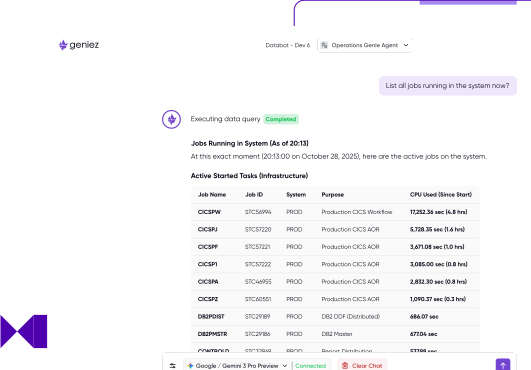
genie chat interface running. As you can
0:19
see, it's connected to uh Google Gemini
0:22
3 flash. And all right, Claire, what
0:24
what would you like to do today?
0:26
Uh, well, everyone's always interested
0:27
in the monthly peak. So let's see if it
0:29
can find a rolling 4hour average for us.
0:32
All right. So we have some uh
0:34
pre-formatted SMF data here and let's
0:36
let's try to ask it. So I'm going to
0:38
type in locate the 4hour window with top
0:44
CPU consumption. All right. And here it
0:47
goes.
0:49
And as you can see I even made a small
0:51
typo and it still understood what I want
0:53
to do. And it's analyzing the CPU usage.
0:57
uh it's thinking how to extract the data
1:01
and it's performing the queries and it
1:04
came back and says that it found the
1:07
4hour window with high CPU consumption
1:09
on December 7 uh between uh noon and 400
1:13
p.m.
1:14
Oh, great. So, um what jobs are actually
1:16
running during that?
1:17
Right, let's try and ask it. uh list the
1:21
top 10 CPU
1:25
consuming jobs in the interval
1:30
and it's now querying the data to
1:33
identify the top CPU consuming jobs and
1:35
it came back with a list of jobs and uh
1:39
the total CPU time each consumed.
1:42
Oh, that's really cool. I don't think
1:44
I'm familiar with that top one. Um how
1:46
do we find out what it does? Let's try
1:49
and ask it. So I'm going to just type
1:52
what does job
1:55
do. As simple as that. All right. So
1:58
it's investigating the job uh and
2:01
extracting the data and it came back and
2:04
it identified uh this is an application
2:07
job managed by the software development
2:10
team. Uh, it's showing us the program
2:13
and the step name. And it says that this
2:17
is an IO inensive job. Apparently,
2:20
reading from tape um, and writing to
2:23
disk.
2:24
Oh, that's really cool. Um, and seeing
2:26
as it's a a high consumer, what would
2:28
happen if we were to move it out of the
2:31
rolling 4hour peak?
2:33
Yeah. So I guess some some people might
2:36
think it doesn't make sense to have a an
2:39
IO consuming job during the monthly
2:41
peak. So we can try and ask it to
2:44
estimate
2:45
uh savings if we
2:49
take this job out of the interval
2:57
and it came back with a wow 42% savings.
3:01
if we take this job out of the uh
3:05
monthly interval.
3:06
That's that's quite impressive. Um and
3:09
it it it definitely shows that it's got
3:11
other jobs related to it as well and it
3:13
links between them too. Um well, how
3:16
about we look at the top IO consumers
3:18
for that interval.
3:20
Yeah, let's see. Let's see what it says.
3:29
So we can simply ask it to list the top
3:31
IIO consumers in the interval
3:34
and it will query the SMF data again.
3:38
And it comes back with the same job and
3:40
a list of several other jobs that are
3:43
CPU consumers and how much uh uh blocks
3:46
count each of them moved during the
3:49
interval.
3:49
That I mean that's really impressive. So
3:51
as you say we can see that the top
3:53
consumers the same job there. Uh so
3:55
let's see if we can dive even deeper
3:56
like what DDs and devices does it use?
4:00
List the DDS and devices
4:04
job
4:06
uses.
4:09
It's going to analyze the DDS and
4:12
devices
4:14
and it came back and it's showing me the
4:17
DD names, the device numbers, uh number
4:20
of blocks transferred and the uh IO
4:23
connect time for each DD. So it seems
4:26
that in fact this job is reading from
4:29
tape and uh moving to disk. All right.
4:34
Well, that's that's really good. I can
4:36
we see a bit of a higher level system
4:38
view on the storage that it's it's
4:40
connected to?
4:41
Yeah. So let let's ask it to show us the
4:44
status of the SMS storage groups.
4:57
So as you can see this time it's getting
4:59
system information. This is a a live
5:02
system information not uh only data
5:05
based on the SMF.
5:08
And it came back with the list of the
5:09
storage groups and the pool types and
5:12
the total space in each storage group,
5:14
how much percent is used, the number of
5:16
volumes, uh and as well the description
5:19
of each storage group.
5:21
Wow, that's really impressive. It shows
5:23
a lot of detail in there. I mean, what
5:26
we've just done there in like 3 4
5:28
minutes would normally take a whole day
5:30
to do. So, yeah, it it's really
5:34
impressive how how quick it manages to
5:35
look through all of that.
5:37
Yeah. All right. Now, we've gone much
5:39
deeper and we've seen what jobs are in
5:41
that peak period, what they're doing,
5:44
and and some of the possible impacts of
5:46
moving them out. And we've managed to do
5:48
all of that in natural language rather
5:50
than having to flip between 3270 and
5:53
lots of other different screens. We've
5:55
managed to do all of that from the
5:57
operations Genie chat interface.
6:00
Yeah.