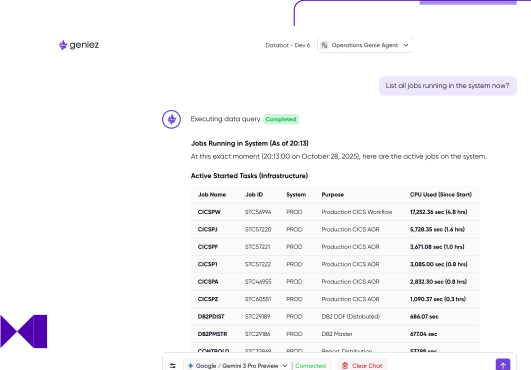
Connect GitHub Copilot, Amazon Q Developer, or Claude Code directly to your live mainframe environment so your developers never have to leave their existing workflow to get answers.

Works with the code assistants and IDEs your developers already use such as VSCode, GitHub Copilot, Amazon Q Developer, Claude Code

Built on the standard MCP protocol

Submit jobs, check output, and diagnose failures using real, live mainframe context
Scan COBOL and Assembler codebases for security flaws directly from the developer's existing tools

Mainframe data never leaves your environment through the LLM connection, so developers get real answers with the confidence that nothing has left the building
Geniez integrates using the standard MCP protocol your code assistant connects to the Geniez Framework server and discovers what mainframe capabilities are available. Since it's defined as an MCP server, setup is simple and standardised, not a custom integration your team has to build and maintain.

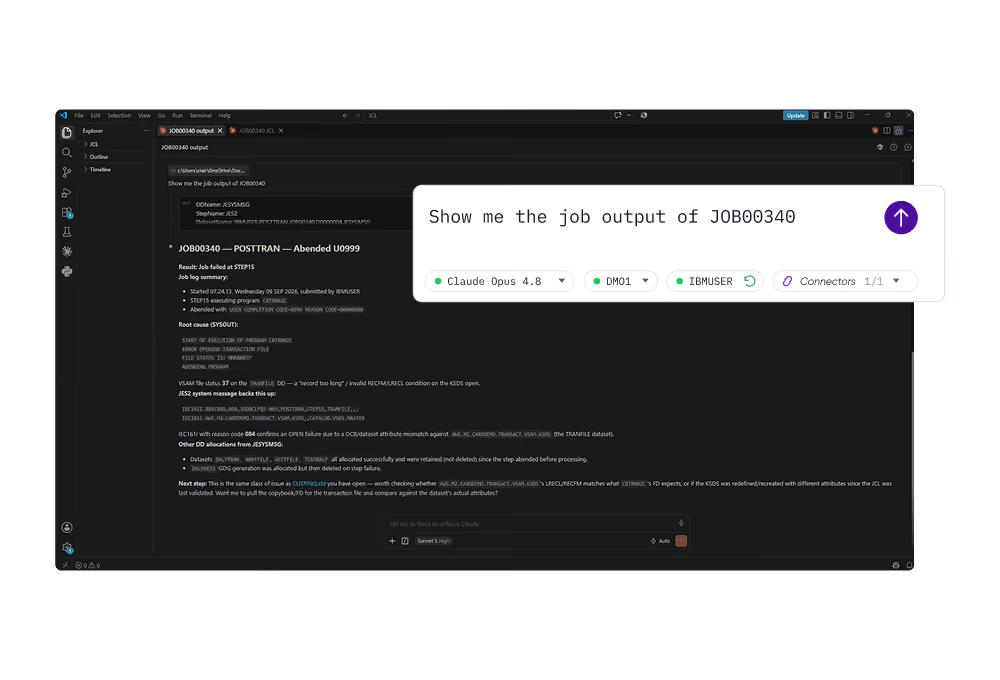
When a job fails, your code assistant doesn't have to guess what went wrong. It can check the actual output. If a job hits an ABEND, the assistant can use the Geniez Framework to pull the real job output, identify the underlying cause, and suggest a fix. Once approved, it can resubmit the job and confirm whether it completes successfully, all without leaving the same conversation.
Organisations are extending their code assistants to scan COBOL and Assembler codebases for security flaws and vulnerabilities. That means better code quality and reduced risk exposure, without asking developers to adopt a separate scanning tool or disrupt how they already work.


Works with the tools developers already use such as GitHub Copilot, Amazon Q Developer, Claude Code.
Integrates as a standard MCP server.
Submit jobs, check real output, and when one fails, pull the output, identify the cause, and suggest a fix all in the same conversation.
Scan COBOL and Assembler codebases for security flaws directly from your environment.
Get real mainframe answers without leaving the editor or switching to a 3270 session.








The Framework is defined as an MCP server inside your code assistant of choice. Your assistant becomes the client, discovers what mainframe capabilities are available, and passes them into the conversation.
No. You ask a question or give an instruction, the assistant executes the needed mainframe actions against the Framework, and the results come straight back into your chat — all without leaving the editor.
No. It's built on the standard MCP protocol, so there's no proprietary plugin or bespoke integration the Framework is simply configured as an MCP server.